Skip to content

Getting Started with React and TypeScript

Getting Started with React and TypeScript

React and TypeScript makes for a fantastic combination when it comes to developing web sites and web applications. With React's focus on creating a fantastic user interface and TypeScript's ability to type check our code, it's never been easier to sanely develop a fantastic user experience.

Prerequisites

Before getting started, you'll need NodeJS and NPM installed. Go here to find instructions on how to install it on your computer.

You should also have a bit of knowledge in using React. If not, I highly recommend getting started learning React using vanilla JavaScript.

Create React App

Facebook's Create-React-App is a preview of the wonderful development experience React has to offer. It will enable us to start writing code immediately.

Check out their documentation here if you have any questions or want to dive in a touch deeper on how the tool works.

In summary, Create-React-App will set up a complete development environment for us. It will configure and conceal build tool configurations for us so that all we need to focus on is our code. Here is some of the tooling that CRA (create-react-app) sets up for us:

Let's use this tool now to create our TypeScript/React development environment. Use the following command to generate a new Typescript React App.

npx create-react-app my-app --template typescript

If you use yarn, use the following command:

yarn create react-app my-app --template typescript

After the tool has finished running, switch directories into my-app run the command npm start to spin up your development environment. Once it's done loading, we should see localhost:3000 open up.
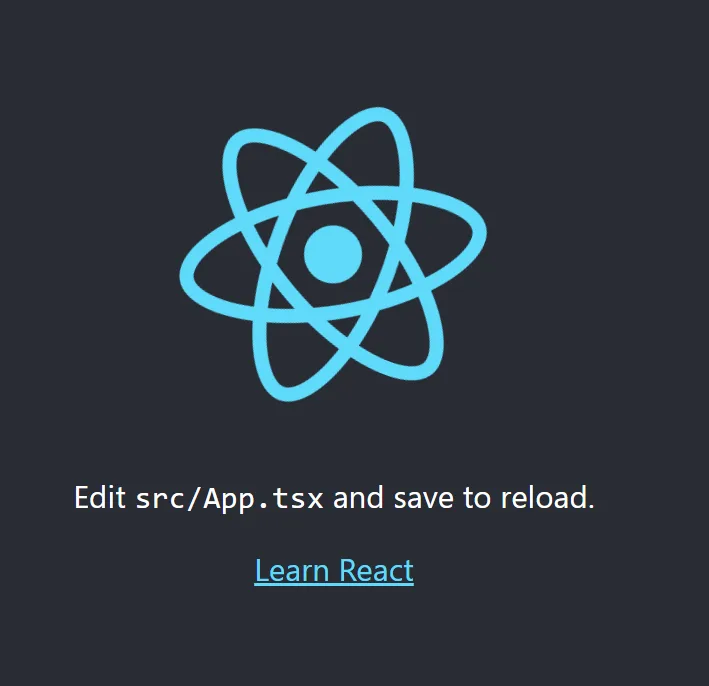
Create React App Home Page

Folder Structure

Create-react-app scaffolds out the folder structure of your app for us, minimizing the amount of code you need to write to go from idea to production.

Here are some important files to take note of:

  • public/index.html - This is the HTML file that consumes the bundle generated by Create-React-App's hidden tooling.
  • src/index.tsx - This is the TypeScript entry point file. All of the project's dependencies are mapped out by Webpack (all set up for us invisibly by CRA) using this file. The bundle generated is injected into public/index.html. This file has a few responsibilities. The most important are:
    • import our main React component
    • Render that App component to the DOM using ReactDom.render()
  • src/App.tsx - This is our main React Component. The .tsx extension tells us that the file uses both TypeScript and JSX. This is the main component in our app which is rendered to the DOM by ReactDOM. We'll spend most of our time in this file getting the hang of writing React code using TypeScript.
  • tsconfig.json - This is the TypeScript configuration file. This file was generated for us by Create-React-App and we can freely edit this configuration to best suit our needs.

Hello, World - With TypeScript and React

Let's get to coding.

To keep things organized, make a new folder src/components and create our new component, src/components/HelloWorld.tsx. In this file, we'll write just 2 lines of code:

const HelloWorld = () => <h1>Hello, World!</h1>
export default HelloWorld

The first line defines our new component. It's simply a function that returns some JSX. In this case, it's our "Hello, World!" heading tag. The second line exports the component, allowing other modules to import it.

To import and use this component, load up src/App.tsx and do the following:

  • Include import HelloWorld from './components/HelloWorld' at the very top of the file to import the component
  • Use the component by having the App component return some JSX which includes <HelloWorld />.

After some refactoring, your App.tsx might look something like this:

import './App.css';
import HelloWorld from './components/HelloWorld'

const App = () => {
  return (
    <div className="App">
      <HelloWorld />
    </div>
  );
}

export default App;

In the above example, I've left the default styles, imported our HelloWorld component, and refactored the JSX which is returned by App so it includes <HelloWorld />.

Hello World in React

Adding a bit of TypeScript

Let's increase the safety of our code by using some TypeScript features.

This is what our src/components/HelloWorld.tsx looks like right now:

const HelloWorld = () => <h1>Hello, World!</h1>
export default HelloWorld

A huge benefit of TypeScript is that it can help us catch errors before you run your code instead of at run-time. Let's introduce a bug to our code:

Refactor our HelloWorld component so it looks like this:

const HelloWorld = () => "Hello, World!"
export default HelloWorld

This is valid JavaScript, but not valid React. A functional component must return JSX (or null). It can't just return a string. We're made aware of this error when Create-React-App tries to build our code.
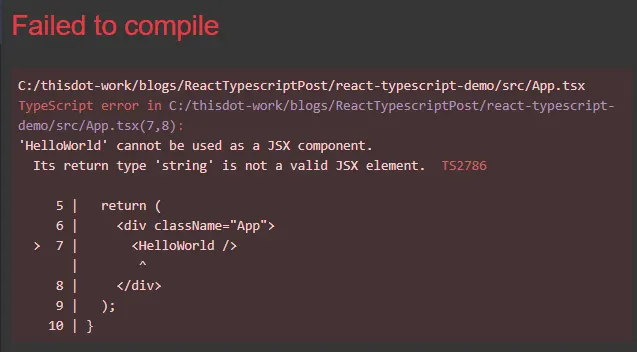
JS-error

Let's refactor our code to use some TypeScript features so our editor notices the error:

import { FC } from 'react'
const HelloWorld: FC = () => "Hello, World!"
export default HelloWorld

The import statement imports the FunctionComponent type FC, and allows us to type our functional component to ensure it returns valid JSX. By typing the function, our editor can now immediately show us our error. Click here for more information on typing functions in TypeScript.

Throwing our first typescript error

TypeScript is explicitly telling us that we can't assign a return type of string to our functional component. Now that TypeScript has shown us this error, let's correct it.

import { FC } from 'react'
const HelloWorld: FC = () => <h1>Hello, World!</h1>
export default HelloWorld

By fixing our function and returning JSX, HelloWorld now passes TypeScript's type checks and no error is thrown. As a result, our project builds and works once more.

Benefits of TypeScript

As shown in the previous example, TypeScript can help us catch errors before we even leave our code editor. This results in faster development since TypeScript will be actively debugging your code as you write. Better to catch silly errors immediately than insanity-inducing errors during run-time.

Let's show another example of how enforcing types can help us catch errors early.

We'll create a new React component, List. This new component will take an array of string data as a prop and return some JSX which renders a <ul> tag and iterate over the list of data, rendering an <li> for each piece of data.

Here is what my version of this component could look like with more type safety from TypeScript included.

src/components/List.tsx

import { FC } from 'react'

const List: FC<{ data: string[] }> = ({ data }) => (
  <ul>
    {data.map(item => <li>{item}</li>)}
  </ul>
)

export default List

Just like our previous example, we import FC from react and use it to type our function. What we're also doing is defining a type for our data prop. In this example, we are saying that data is an array of strings. Notice how self-documenting that is. This is a huge benefit of TypeScript.

Now let's insert this component into src/App.tsx, pass into it an array of data, and sprinkle in a bit more TypeScript.

src/App.tsx

import './App.css';
import { FC } from 'react'
import HelloWorld from './components/HelloWorld'
import List from './components/List'

const avengers = [
  'Captain America',
  'Iron Man',
  'Black Widow',
  'Thor',
  'Hawkeye',
]

const App: FC = () => {
  return (
    <div className="App">
      <HelloWorld />
      <List data={avengers} />
    </div>
  );
}

export default App;

We created an avengers array, with 5 members of the Avengers team. We then passed in this list of data as a property to List. This example works because we defined List to accept an array of strings. Let's trigger a TypeScript error and send it a more varied array.

import './App.css';
import { FC } from 'react'
import HelloWorld from './components/HelloWorld'
import List from './components/List'

const avengers = [
  'Captain America',
  'Iron Man',
  'Black Widow',
  'Thor',
  'Hawkeye',
  {
    name: 'Vision',
  },
  {
    name: 'Hulk',
    color: 'green',
  },
]

const App: FC = () => {
  return (
    <div className="App">
      <HelloWorld />
      <List data={avengers} />
    </div>
  );
}

export default App;

We added 2 new heroes to the avengers array, Vision and the Hulk, but we added them as objects, not as strings. This causes TypeScript to throw an error.
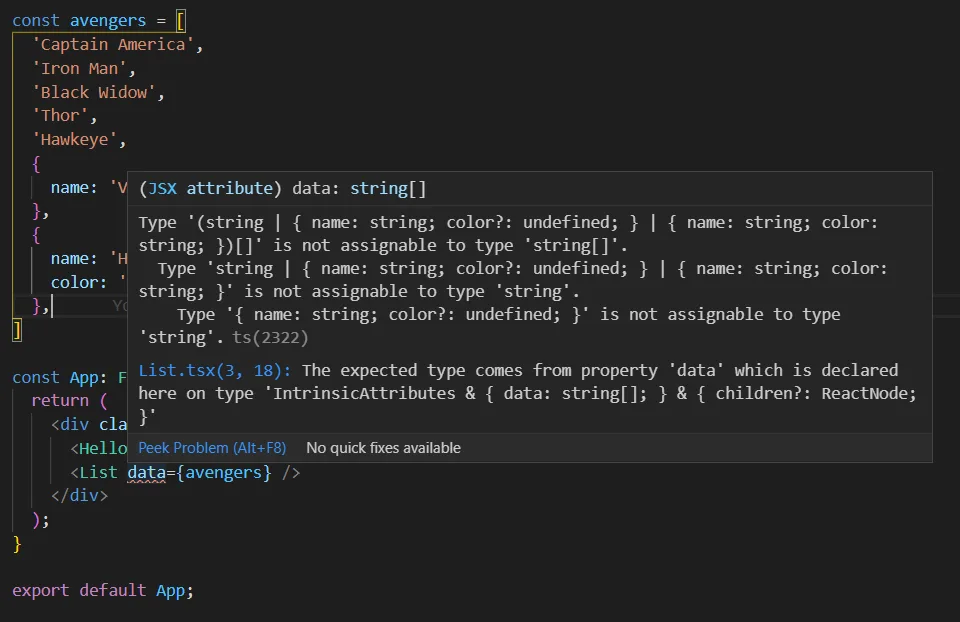
Another TypeScript Error

TypeScript is telling us that our data doesn't fit the definition of the data prop. It even points out to us exactly where this prop is defined. Let's assume that we should be sending an array of objects instead of strings. Let's refactor our files so everything works again.

src/App.tsx

import './App.css';
import { FC } from 'react'
import HelloWorld from './components/HelloWorld'
import List from './components/List'

const avengers = [
  { name: 'Captain America' },
  { name: 'Iron Man' },
  { name: 'Black Widow' },
  { name: 'Thor' },
  { name: 'Hawkeye' },
  { name: 'Vision' },
  { name: 'Hulk' },
]

const App: FC = () => {
  return (
    <div className="App">
      <HelloWorld />
      <List data={avengers} />
    </div>
  );
}

export default App;

src/components/List.tsx

import { FC } from 'react'

const List: FC<{ data: { name: string }[] }> = ({ data }) => (
  <ul>
    {data.map(({ name }) => <li>{name}</li>)}
  </ul>
)

export default List

We changed our List component definition and explicitly typed the data prop to be an array of objects containing a string type name property. By explicitly typing our data prop, we know its exact shape and can catch if we send this component any prop that is shaped differently than this.
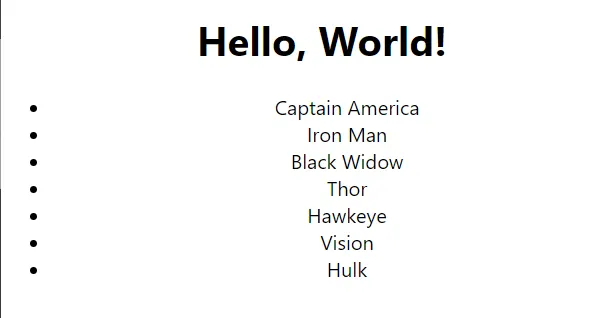
Avengers UI

Conclusion

By adding a type layer over JavaScript, TypeScript successfully saves developers time and frustration, even giving us a hand in self-documenting our code. While there surely is much more left to learn in typing your React applications, this should be a good platform to begin wading into the deep end of the pool, so to speak.

Happy coding!

This Dot Labs is a development consultancy that is trusted by top industry companies, including Stripe, Xero, Wikimedia, Docusign, and Twilio. This Dot takes a hands-on approach by providing tailored development strategies to help you approach your most pressing challenges with clarity and confidence. Whether it's bridging the gap between business and technology or modernizing legacy systems, you’ll find a breadth of experience and knowledge you need. Check out how This Dot Labs can empower your tech journey.

You might also like

Building interactive forms with TanStack Form cover image

Building interactive forms with TanStack Form

TanStack Form is a new headless form library that makes building more complex and interactive forms easy. TanStack has understood the power of ‘headless’ UI libraries for quite some time with some really incredible tools like TanStack Table and TanStack Query. Given the high quality of all the other libraries in the TanStack suite, I was excited to give this new form library a try. If you’ve used react-hook-form before the two libraries have quite a bit in common. The transition should be mostly straightforward. Let's start by comparing the two libraries and bit and then dig into the TanStack Form API with some examples and code. Comparison to react-hook-form At a high level, the two libraries are pretty similar: - Headless, hook-based API - Performance (both libraries minimize amount of renders triggered by state changes) - Lightweight, zero-dependencies (TanStack 4.4kb, react-hook-form 9.7kb) - Comprehensive feature set - Type-safety / TypeScript support There are a few things that set TanStack Form apart: - UI Agnostic - TanStack Form offers support for other UI libraries and frameworks through a plugin-style system. Currently, React is supported out of the box. - Simpler API and documentation - The API surface area is a bit smaller, and the documentation makes it easy to find the details on all the APIs. - First-class TypeScript support - TanStack Form provides really impressive type inference. It stays out of your way and lets you focus on writing code instead of wrangling types. One common feature not supported in TanStack Form currently is validation schemas. react-hook-form supports integration with validation libraries like Zod and Yup. You can plug in a schema and react-hook-form will automatically validate your form against the schema. Building forms Since the API for TanStack Form is pretty small, we can walk through the important APIs pretty quickly to see how they work together to help us build interactive client-side forms. useForm(options) useForm accepts an options object that accepts defaultValues, defaultState, and event handler functions like onSubmit, onChange, etc. The types are clear, and the source code is easy to read so you can refer to FormApi.ts file for more specifics. Currently, the examples on the website don’t provide a type for the generic TData that useForm accepts. It will infer the form types based on the defaultValues that are provided, but in this example, I will provide the type explicitly. ` The API for your form is returned from the useForm hook. We will use this API to build the fields and their functionality in our component. useField(opts) If you want to abstract one of your form fields into its own component we can use the useField hook. The useField generic parameters take the type definition of your form and the field name. ` Validation is as simple as returning a string from your field onChange handler. For our password field we return an error message if the length isn’t at least 8 characters long. We bind our field states and event handlers to the form input by passing them in as props. Component API form includes a component API with a Context Provider, a component for rendering Field components, and a Subscribe component for subscribing to state changes. I’ve added the remaining fields to our form using the Field component and included our PasswordField from above. Using the Field component is similar to using the useField hook - the difference is our field instance gets passed in via a render prop. ` We wrapped our submit button with the Subscribe component which has a pretty interesting API. Subscribe allows you to subscribe to state changes granularly. Whatever state items you return from the selector gets passed into the render prop and re-render it on changes. This will be really useful in places where render performance is critical. Async event handlers We can use the built-in async handlers and debounce options to implement a search input. This feature makes a common pattern like this trivial. ` Async event handlers can be used for other things like async validation as well. We could update our email input from our create account form to check to see if the account already exists. ` Conclusion If you don’t mind taking a chance on a newer library from a well-established author in the ecosystem, Tanstack Form is a solid choice. The APIs are easy to understand, and it has some nice async event handling features that are extremely useful. If validation with deep integration with a schema library like Zod is a requirement, you might want to stick with react-hook-form for now. You can definitely still use a validation library with TanStack Form, it will just take a little more work on your part to get it all wired up....

Does Replay Fix All ​​Debugging Issues? cover image

Does Replay Fix All ​​Debugging Issues?

Rob Ocel and Adam Barrett talk with Jason Laster, CEO and co-founder of Replay. For those of you who are unfamiliar, Replay is an innovative browser development tool that is revolutionizing the way developers approach time travel debugging and bug fixing. This episode highlights all the reasons why Replay is such an amazing tool and all the problems it solves for developers. Jason shares the background on where the concept of time travel debugging came from, and how it actually works in Replay. The idea that you can capture a bug once and replay it as many times as needed enables developers to zoom in and identify the root cause of the issue. This approach saves infinite time, as you no longer have to rely on guesswork or spend hours reproducing bugs. Download this podcast episode here!...

GraphQL Updates- October 2021 cover image

GraphQL Updates- October 2021

State of GraphQL State of GraphQL brings together core contributors, members of the GraphQL Foundation, and community leaders to talk about the future of GraphQL, and answer audience questions. Sponsors Shout-out to the sponsors of the event, StepZen and Moon Highway! - StepZen > One GraphQL API. All Your Data. Zero Infrastructure. StepZen is a GraphQL-as-a-Service provider, even including a FREE forever pricing tier with 300k calls/month included. - Moon Highway > The cutting edge JavaScript training for engineers of all skill levels Moon Highway is a training company that teaches a lot of courses centered around the JavaScript ecosystem. - JavaScript & Node - React - GraphQL Hosts - Tracy Lee, CEO, This Dot Labs - Eve Porcello, Co-founder & Instructor, Moon Highway Panelists - Uri Goldshtein, Founder, The Guild - Carlos Rufo, Engineering Lead, GraphCMS - Joey Nenni, Web Engineering Lead (GraphQL), PayPal - Janessa Garrow, Developer Experience Engineer, Apollo GraphQL - Tanmai Gopal, Founder, Hasura GraphQL Updates The first portion of the State of GraphQL covered updates from each panelist. The GraphQL Foundation One of the first topics covered by State of GraphQL was The GraphQL Foundation. > The GraphQL Foundation is a neutral foundation founded by global technology and application development companies. The GraphQL Foundation encourages contributions, stewardship, and a shared investment from a broad group in vendor-neutral events, documentation, tools, and support for GraphQL. > > GraphQL.org Uri opened up the conversation by emphasizing how open the foundation is. The GraphQL Foundation has always been open, but it's now easier than ever to become part of the community. The true "meat" of where the GraphQL action is though is in the GraphQL Working Group. There, topics such as changes to the GraphQL spec, ideas for new features, and more are discussed. Also, all the meetings are recorded and even summarized by text! Apollo Odyssey > Odyssey is Apollo's free interactive learning platform. Janessa from the Apollo team introduced us to Apollo Odyssey. Odyssey is Apollo's official learning platform. It was created to improve the developer experience of learning GraphQL. While some people may be able to learn effectively from docs, others may find different learning styles, like those offered by Odyssey, a more effective way of learning. Courses offered range from the basics, like what are queries and resolvers, to the more advanced subjects, such as Apollo Federation. Hasura Tanmai from Hasura spoke next about updates done within Hasura. One of the biggest new features is support for cross-database joins over GraphQL. This update allows the developer to retrieve data from any number of data stores with efficient queries. The next thing being worked on now is end-to-end streaming. PayPal Joey Nenni of PayPal spoke about PayPal's experience with adopting GraphQL. He mentioned that once PayPal supported developers with tooling and sample apps, GraphQL spread like wildfire. Seeing the potential to do more with GraphQL, especially with sharing components, PayPal looked into Apollo Federation about 9 months ago, and as of about 2 weeks ago, they are now live with millions of requests already going through their gateway. Joey also spoke about how GraphQL adoption is really about persistence. It's an iterative process. By making small steps, collecting small wins, and repeating that process, it becomes a lot easier to sell GraphQL. Joey coined the term "Guerilla Warfare" when it comes to finding successful implementations for GraphQL solutions. GraphCMS > GraphCMS gives you instant GraphQL Content APIs to create, enrich, unify, and deliver your content across platforms. GraphCMS recently hosted GraphQL Conf AND has recently raised $10 million in a Series A funding round. With all of this GraphQL focused momentum, GraphCMS is poising itself as a powerful solution for Headless CMS. > The ultimate content platform that enables you to deliver applications at scale. > > Carlos Rufo Defer and Stream One important piece of information that Uri brought to the groups' attention was that defer, stream, live queries, and other features in spec proposals, but not in the actual spec, CAN BE USED SAFELY. Uri noticed a patter in production settings: once people have been given the option to use these new features, like defer, they see how valuable those features can be. If you want to see more information involving these GraphQL directives, you can check out a blog post covering them here. Apollo Federation > Implement a single graph across multiple services > > Apollo Documentation One very popular subject that is commonly brought up in Apollo conversations is Apollo Federation, and the idea of having a unified Graph connecting many services. For PayPal, they spoke about the experiences encountered while transitioning some of their shared logic to a federated graph, while maintaining developer experience. Apollo itself had a very positive experience using Apollo Federation. They ran into the need to unite two services, one written in Kotlin, and one in TypeScript, and have them run under a single gateway. This was a very big win and prevented the need for developers to learn additional languages to support a larger graph. Tanmai had a balanced perspective on Apollo Federation: > Are we federating how the API comes together and presents itself? Or are we federating the execution itself? He shared his experiences with analyzing where exactly a federated graph could be a good fit. For Uri, he spoke about how the most important question is, "Are we actually making the product development faster?" Adopting Apollo Federation may give a different answer depending on the team and work being done. Conclusion GraphQL is still growing rapidly, and as shown in this State of GraphQL, there is a growing thriving community surrounding it. Continue the conversation, no matter your experience level, and check out the GraphQL Working Group. While this was a quick summary of the things spoken about during the State of GraphQL, you can catch the whole video on YouTube. Thank you for enjoying the State of GraphQL!...

ChatGPT can't solve these problems! with Chris Gardner cover image

ChatGPT can't solve these problems! with Chris Gardner

Chris Gardner talks neural networks, covering fundamental concepts, historical development, and practical applications. It’s important to understand the difference between artificial intelligence (AI) and machine learning, and the role of neural networks in solving intricate problems with vast datasets. This conversation centers around the intricacies of training neural networks, particularly as they become more complex with multiple layers. Chris and Rob touch on the fascinating yet daunting nature of neural networks, discussing their ability to learn beyond human comprehension. Turning to the practical side of using neural networks, Chris shares the existence of libraries that exist to simplify the process of building a network, enabling users to input data, specify parameters, and entrust the system with the training. Both caution about the biases inherent in the data and the responsibility associated with working on machine learning models. They address challenges related to ethics, highlighting the difficulties in identifying biases and emphasizing the delicate balance between excitement and caution in the evolving field of machine learning. Listen to the podcast here: https://modernweb.podbean.com/e/chris-gardner/...