Skip to content

Working with NgRx Effects

This article was written over 18 months ago and may contain information that is out of date. Some content may be relevant but please refer to the relevant official documentation or available resources for the latest information.

Working with NgRx Effects

Almost every web application will, at some point, need to interact with some external resources. The most classic solution to that would be a service-based approach where components are calling and interacting with the external resources directly through services. In this case, most of the heavy lifting is delegated to the services and a component in this scenario still carries a responsibility to directly initiate those interactions.

NgRx Effects provides us with a way to isolate interactions, with the aforementioned services, from the components. Within Effects, we can manage various tasks ie. communication with the API, long-running tasks, and practically every other external interaction. In this scenario, the component doesn't need to know about these interactions at all. Its only requires some input data and then emits simple events (actions).

In this article, we will build on top of the application we started in Introduction to NgRx. You can find the entry point for this article on my GitHub repo. If you want to follow this article's code, please clone the repository and checkout the effects_entryPoint tag.

git clone git@github.com:ktrz/introduction-to-ngrx.git

git checkout effects_entryPoint

After cloning, just install all the dependencies.

yarn install

and you can see the example app by running

yarn start -o

Getting started

In order to add NgRx Effects to our application, all we need to do is use the ng add functionality offered by the Angular CLI. Run the following command:

ng add @ngrx/effects@latest

It will add and install the @ngrx/effects library to your package.json and scaffold your AppModule to import the NgRx EffectsModule into your application.

This is the code that the Angular CLI will generate for you:

/* Other imports */
import { EffectsModule } from '@ngrx/effects';

@NgModule({
  declarations: [
    AppComponent
  ],
  imports: [
    /* Other imported modules */
    EffectsModule.forRoot([]),
  ],
  bootstrap: [AppComponent]
})
export class AppModule {
}

With the setup complete, we can start modifying the app to introduce and handle some API calls using Effects.

Design interactions - Actions & Reducers

When you're designing new features, I highly encouarge you to first create the actions which we expect to see in the application. Let's look at the example API, which you can clone and checkout: effects_ready branch from this repo. Then, use the npm start command to run it locally.

The API consists of the following endpoints:

GET /api/photos - returns an array of photos PUT /api/photos/:photoId/like - returns the photo that was liked PUT /api/photos/:photoId/dislike - returns photo that was disliked

We can start designing our app interactions by handling how the list of photos is loaded. First, we'll need a trigger action to start fetching the list of photos. Since the request can either return successfully, or with an error, let's model that as well within the actions:

// src/app/store/photo.actions.ts
import {createAction, props} from '@ngrx/store';
import {Photo} from '../photo/photo';

export const loadPhotos = createAction('[Photo List] Load Photos');
export const loadPhotosSuccess = createAction('[Photo List] Load Photos Success', props<{photos: Photo[]}>());
export const loadPhotosError = createAction('[Photo List] Load Photos Error');

We have modeled the actions that might occur in the application. Now it's time to handle them properly in the photo.reducer.ts.

// src/app/store/photo.reducer.ts

/* other imports */
import {loadPhotosSuccess} from './photo.actions';

const initialState: PhotoState = {};

export const photoReducer = createReducer(
  initialState,
  /* previous `on` handlers */
  on(loadPhotosSuccess, (state, {photos}) => photos.reduce((acc, photo) => ({
    ...acc,
    [photo.id]: photo
  }), {}))
);

Since we're getting an array of photos, and we're keeping them in the state as an id-indexed map, we just need to transform it into the appropriate shape. Since we assume that the API returns all of the photos, we can replace the whole previous state.

Great! We now have a correctly working reducer. However, we don't actually emit any action that will put the data in our Store anywhere in our application. To verify that it works correctly, we can dispatch loadPhotosSuccess action in our AppComponent:

// src/app/app.component.ts

export class AppComponent implements OnInit {
  photos$ = this.store.select(selectPhotos);

  constructor(private store: Store<AppState>) {
  }

  ngOnInit(): void {
    this.store.dispatch(loadPhotosSuccess({
      photos: [
        {
          id: '2d335401-d65e-4059-b8f0-a4816c82086f',
          title: 'Introduction to NgRx',
          url: 'https://ngrx.io/assets/images/ngrx-badge.png',
          likes: 0,
          dislikes: 0,
        },
        {
          id: '65a7eb36-f887-4a93-8fe7-38d20c77906f',
          title: 'Angular',
          url: 'https://angular.io/assets/images/logos/angular/angular.png',
          likes: 0,
          dislikes: 0,
        }
      ]
    }));
  }
}

The data is loaded correctly and all the other functionality is still working as expected. Let's revert this dispatch so we can finally create our Effects, which will allow our available photos to asynchronously load.

Create Effects

In NgRx, Effects are encapsulated in a regular Angular Injectable class. To let NgRx know to use our class as Effects, we need to add an EffectsModule.forRoot([]) array inside of our AppModule imports:

// src/app/store/photo.effects.ts

import {Actions} from '@ngrx/effects';
import {PhotoService} from '../api/photo.service';
import {Injectable} from '@angular/core';

@Injectable()
export class PhotoEffects {
  constructor(
    private actions$: Actions, // this is an RxJS stream of all actions
    private photoService: PhotoService // we will need this service for API calls
  ) {}
}
// src/app/app.module.ts

@NgModule({
  declarations: [
    AppComponent
  ],
  imports: [
    / * other imports */
    EffectsModule.forRoot([PhotoEffects]),
    // this is necessary for `PhotoService` to have access to the HttpClient
    HttpClientModule
  ],
  providers: [],
  bootstrap: [AppComponent]
})
export class AppModule {}

Inside of the PhotoEffects, we will create properties that will react to specific actions being dispatched, perform some side effect (in this case an API call), and susequently dispatch another action based on the API call result. This flow is presented in the following diagram:
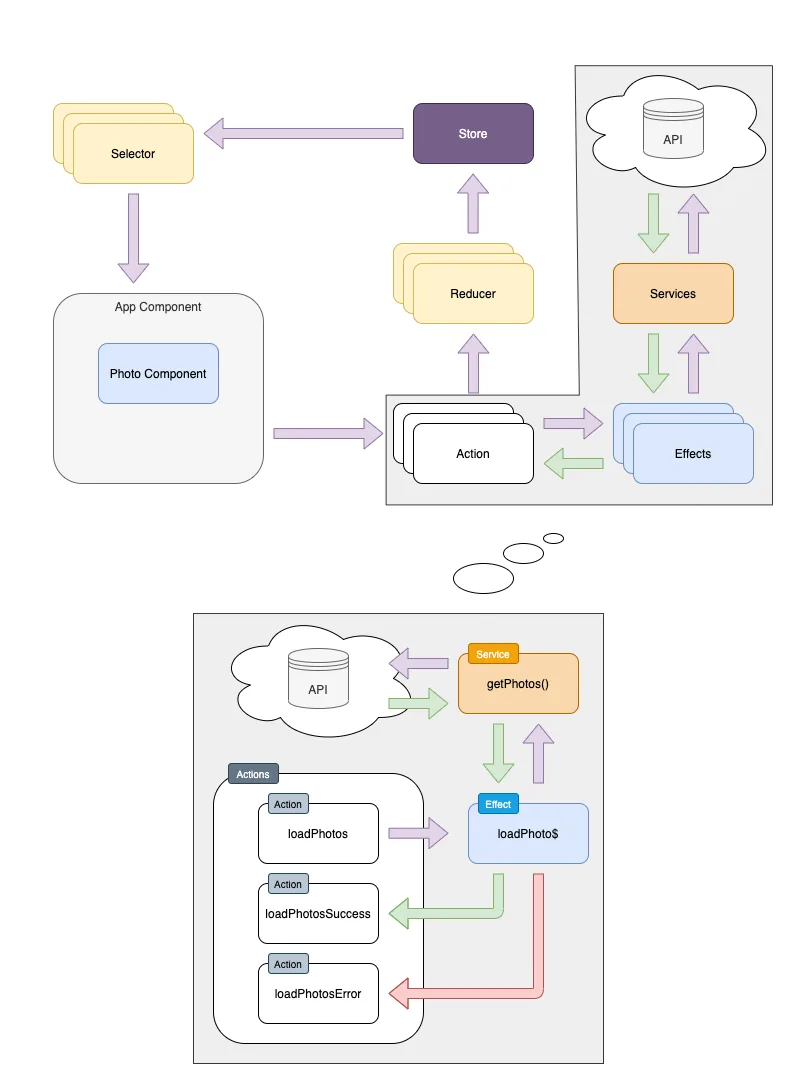
Effects diagram

In our case, we will listen for the loadPhotos action being dispatched. Then, we will call the PhotoService -> getPhotos() method, which should either return the correct data, or return an error (ie. a network error). Upon receiving data, we can dispatch the loadPhotosSuccess action, and in order to handle possible errors, we might dispatch loadPhotosError:

// src/app/store/photo.effects.ts

import {Actions, createEffect, Effect, ofType} from '@ngrx/effects';
import {PhotoService} from '../api/photo.service';
import {Injectable} from '@angular/core';
import {loadPhotos, loadPhotosError, loadPhotosSuccess} from './photo.actions';
import {catchError, map, switchMap} from 'rxjs/operators';
import {of} from 'rxjs';

@Injectable()
export class PhotoEffects {
  loadPhotos$ = createEffect(() =>
    this.actions$.pipe(
      ofType(loadPhotos),
      switchMap(() => this.photoService.getPhotos().pipe(
        map(photos => loadPhotosSuccess({photos})),
        catchError(() => of(loadPhotosError()))
      ))
    )
  );

  constructor(
    private actions$: Actions,
    private photoService: PhotoService
  ) {}
}

The app still doesn't do anything. That's because we need the loadPhotos action to be dispatched somewhere. We can do it on the AppComponent initialization inside of ngOnInit lifecycle hook.

// src/app/app.component.ts

export class AppComponent implements OnInit {
  /* Rest of the component */

  constructor(private store: Store<AppState>) {}

  ngOnInit(): void {
    this.store.dispatch(loadPhotos());
  }

  /* Rest of the component */
}

If we look at our application again, we can see that the correct data has loaded. In the network tab of the Dev Tools, we can see the correct API being called. Liking/disliking still works, at least until we refresh the page. We still don't perform any API calls when we like or dislike a photo. Let's implement that behavior similarly to how we implemented photo loading.

The easiest way to accomplish this is by treating the likePhotoand dislikePhoto actions as triggers for the API call, and upon a successful or failed response, emitting a new action. Let's name those updatePhotoSuccess and updatePhotoError:

// src/app/store/photo.actions.ts

import {createAction, props} from '@ngrx/store';
import {Photo} from '../photo/photo';

/* other actions */

export const updatePhotoSuccess = createAction('[Photo List] Update Photo Success', props<{photo: Photo}>());
export const updatePhotoError = createAction('[Photo List] Update Photo Error');

Now, in reducer, instead of having separate handling for like and dislike, we can replace it with a single handler for updatePhotoSuccess

// src/app/store/photo.reducer.ts

/* Rest of the file */

const initialState: PhotoState = {};

export const photoReducer = createReducer(
  initialState,
  on(updatePhotoSuccess, (state, {photo}) => ({
    ...state,
    [photo.id]: photo
  })),
  on(loadPhotosSuccess, (state, {photos}) => photos.reduce((acc, photo) => ({
    ...acc,
    [photo.id]: photo
  }), {}))
);

Now, with all actions and reducers in place, all that is left to do is add a new effect responsible for performing API call and emitting a new action for updating the state.

@Injectable()
export class PhotoEffects {
  / * loadPhotos$ effect */

  likePhoto$ = createEffect(() => this.actions$.pipe(
    ofType(likePhoto),
    mergeMap(({id}) => this.photoService.likePhoto(id).pipe(
      map(photo => updatePhotoSuccess({photo})),
      catchError(() => [updatePhotoError()])
    ))
  ));

  dislikePhoto$ = createEffect(() => this.actions$.pipe(
    ofType(dislikePhoto),
    mergeMap(({id}) => this.photoService.dislikePhoto(id).pipe(
      map(photo => updatePhotoSuccess({photo})),
      catchError(() => [updatePhotoError()])
    ))
  ));

  /* constructor */
}

Conclusion

Now, all the functionality is still working, and our data is kept safely on the server. All of this was done without modifying the component's code (except for initial dispatch of loadPhotos). That means we can add some complex logic for how we handle data (ie. add data polling, optimistic update, caching etc.) without requiring the components to know about this. This enables us to keep the codebase cleaner and much easier to maintain.

You can find the code for this article's end result on my GitHub repos:

In case you have any questions you can always tweet or DM me @ktrz. I'm always happy to help!

This Dot is a consultancy dedicated to guiding companies through their modernization and digital transformation journeys. Specializing in replatforming, modernizing, and launching new initiatives, we stand out by taking true ownership of your engineering projects.

We love helping teams with projects that have missed their deadlines or helping keep your strategic digital initiatives on course. Check out our case studies and our clients that trust us with their engineering.

You might also like

Incremental Hydration in Angular cover image

Incremental Hydration in Angular

Incremental Hydration in Angular Some time ago, I wrote a post about SSR finally becoming a first-class citizen in Angular. It turns out that the Angular team really treats SSR as a priority, and they have been working tirelessly to make SSR even better. As the previous blog post mentioned, full-page hydration was launched in Angular 16 and made stable in Angular 17, providing a great way to improve your Core Web Vitals. Another feature aimed to help you improve your INP and other Core Web Vitals was introduced in Angular 17: deferrable views. Using the @defer blocks allows you to reduce the initial bundle size and defer the loading of heavy components based on certain triggers, such as the section entering the viewport. Then, in September 2024, the smart folks at Angular figured out that they could build upon those two features, allowing you to mark parts of your application to be server-rendered dehydrated and then hydrate them incrementally when needed - hence incremental hydration. I’m sure you know what hydration is. In short, the server sends fully formed HTML to the client, ensuring that the user sees meaningful content as quickly as possible and once JavaScript is loaded on the client side, the framework will reconcile the rendered DOM with component logic, event handlers, and state - effectively hydrating the server-rendered content. But what exactly does "dehydrated" mean, you might ask? Here's what will happen when you mark a part of your application to be incrementally hydrated: 1. Server-Side Rendering (SSR): The content marked for incremental hydration is rendered on the server. 2. Skipped During Client-Side Bootstrapping: The dehydrated content is not initially hydrated or bootstrapped on the client, reducing initial load time. 3. Dehydrated State: The code for the dehydrated components is excluded from the initial client-side bundle, optimizing performance. 4. Hydration Triggers: The application listens for specified hydration conditions (e.g., on interaction, on viewport), defined with a hydrate trigger in the @defer block. 5. On-Demand Hydration: Once the hydration conditions are met, Angular downloads the necessary code and hydrates the components, allowing them to become interactive without layout shifts. How to Use Incremental Hydration Thanks to Mark Thompson, who recently hosted a feature showcase on incremental hydration, we can show some code. The first step is to enable incremental hydration in your Angular application's appConfig using the provideClientHydration provider function: ` Then, you can mark the components you want to be incrementally hydrated using the @defer block with a hydrate trigger: ` And that's it! You now have a component that will be server-rendered dehydrated and hydrated incrementally when it becomes visible to the user. But what if you want to hydrate the component on interaction or some other trigger? Or maybe you don't want to hydrate the component at all? The same triggers already supported in @defer blocks are available for hydration: - idle: Hydrate once the browser reaches an idle state. - viewport: Hydrate once the component enters the viewport. - interaction: Hydrate once the user interacts with the component through click or keydown triggers. - hover: Hydrate once the user hovers over the component. - immediate: Hydrate immediately when the component is rendered. - timer: Hydrate after a specified time delay. - when: Hydrate when a provided conditional expression is met. And on top of that, there's a new trigger available for hydration: - never: When used, the component will remain static and not hydrated. The never trigger is handy when you want to exclude a component from hydration altogether, making it a completely static part of the page. Personally, I'm very excited about this feature and can't wait to try it out. How about you?...

Angular 18 Announced: Zoneless Change Detection and More cover image

Angular 18 Announced: Zoneless Change Detection and More

Angular 18 Announced: Zoneless Change Detection and More Angular 18 has officially landed, and yet again, the Angular team has proven that they are listening to the community and are committed to continuing the framework's renaissance. The release polishes existing features, addresses common developer requests, and introduces experimental zoneless change detection. Let's examine the major updates and enhancements that Angular 18 offers. 1. Zoneless Angular One of the most exciting features of Angular 18 is the introduction of experimental support for zoneless change detection. Historically, Zone.js has been responsible for triggering Angular's change detection. However, this approach has downsides, especially regarding performance and debugging complexity. The Angular team has been working towards making Zone.js optional, and Angular 18 marks a significant milestone in this journey. Key Features of Zoneless Angular 1. Hybrid Change Detection: In Angular 18, a new hybrid change detection mode is enabled by default. This mode allows Angular to listen to changes from signals and other notifications regarding changes that occur either inside an Angular zone or not. That effectively means you can write (library) code that works regardless of whether Zone.js is being used, paving the way to fully zoneless apps without compromising backward compatibility. For new applications, Angular enables zone coalescing by default, which removes the number of change detection cycles and improves performance. For existing applications, you can enable zone coalescing by configuring your NgZone provider in bootstrapApplication: ` 2. Experimental API for Zoneless Mode: Angular 18 introduces an experimental API to disable Zone.js entirely. This API allows developers to run applications in a fully zoneless mode, paving the way for improved performance and simpler debugging. The zoneless change detection requires an entirely new scheduler which relies on notifications from the Angular core APIs, such as ChangeDetectorRef.markForCheck (called automatically by the AsyncPipe), ComponentRef.setInput, signal updates, host listener updates, or attaching a view that was marked dirty. 3. Improved Composability and Interoperability: Zoneless change detection enhances composability for micro-frontends and interoperability with other frameworks. It also offers faster initial render and runtime, smaller bundle sizes, more readable stack traces, and simpler debugging. How to Try Zoneless Angular To experiment with zoneless change detection, you can add the provideExperimentalZonelessChangeDetection provider to your application bootstrap: ` After adding the provider, remove Zone.js from your polyfills in angular.json. You can read more about the experimental zoneless change detection in the official documentation. By the way, angular.dev is now considered the official home for Angular developers! 2. Server-side Rendering and Hydration Enhancements A feature I'm particularly excited about is the improvements to Angular's server-side rendering (SSR) and hydration in terms of developer experience and debugging: 1. Enhanced DevTools Support: Angular DevTools now includes overlays and detailed error breakdowns to help visualize and debug hydration issues directly in the browser. This refreshing focus on developer experience shows that the Angular team wants to make the framework more approachable and user-friendly. 2. Hydration Support for Angular Material: All Angular Material components now support client hydration and are no longer skipped, which enhances performance and user experience. 3. Event Replay: Available in developer preview, event replay captures user interactions during SSR and replays them once the application is hydrated, ensuring a seamless user experience before complete hydration. It is powered by the same library as Google Search. 4. i18n Hydration Support: Up to v17, Angular skipped hydration for components with i18n blocks. From v18, hydration support for i18n blocks is in developer preview, allowing developers to use client hydration in internationalized applications. 3. Stable Material Design 3 After introducing experimental support for Material Design 3 in Angular 17, Angular 18 now includes stable support. The key features of Material Design 3 in Angular 18 include: 1. Simplified Theme Styles: Based on CSS variables, the new theming styles offer more granular customization and a flexible API for applying color variants to components. 2. Theming Generation Schematics: Using the Ng CLI, you can generate Material 3 themes. 3. Sass APIs: New Sass APIs allow developers to read colors, typography, and other properties from the Material 3 theme, making it easier to create custom components. How to use Material Design 3 in Angular 18 To use Material Design 3 in Angular 18, you can define a theme in your application's styles.scss file using the mat.defineTheme function: ` Or generate a Material 3 theme using the Ng CLI: ` You can then apply the theme to your application using the mat.theme mixin: ` Head to the official guide for a more detailed guide. You'll also notice they have refreshed the docs with the new themes and further documentation. 4. Signal-Based APIs The path to fully signal-based components includes new signal inputs, model inputs, and signal query APIs. We already wrote about them as they were in developer-preview in v17, but they have been further refined in v18. These APIs offer a type-safe, reactive way to manage state changes and interactions within components: 1. Signal Input API: Signal inputs allow values to be bound from parent to child components. Those values are exposed using a signal and can change during the component's life cycle. 2. Model Input API: Model inputs are a special input type that enables a component to propagate new values back to the parent component. That allows developers to keep the parent component in sync with the child component with two-way binding. 3. Signal Query API: This was a particularly requested feature from the community. The signal query APIs work the same way as ViewChild and ContentChild under the hood, but they return signals, providing more predictable timing and type safety. 5. Fallback Content For ng-content A very requested feature from the community, Angular 18 introduces a new ng-content directive that allows developers to define fallback content when no content is projected into a component. This feature is particularly useful for creating reusable components with default content. Here's an example of using the new ng-content directive. Using the following component ` like this ` will render Howdy World. 6. Other Improvements In addition to the major updates mentioned above, Angular 18 also includes several other improvements and updates: 1. TypeScript 5.4: Angular 18 now supports TypeScript 5.4, which lets you take advantage of new features such as preserved narrowing in closures following last assignments. 2. Global Observable in Angular Forms: Angular 18 introduces a global events observable in Angular forms, which allows you to track all changes around any abstract control and its children, including the touched or dirty in a single observable. Here's an example of how you can use the global observable: ` 3. Stable Deferrable views: Deferrable views are now stable in Angular 18. 4. Stable Control Flow: The built-in control flow is now stable in Angular 18! It is more performant than its predecessor. It also received improved type checking, including guardrails for certain performance-related anti-patterns. 5. Route Redirects as Functions: For added flexibility in managing redirects, Angular v18 now lets you use a function for redirectTo that returns a string, which allows you to create more sophisticated redirection logic based on runtime conditions. For example: ` Conclusion Angular 18 is a significant release that brings many new features, enhancements, and experimental APIs to the Angular ecosystem. The introduction of zoneless change detection, improvements to server-side rendering and hydration, stable Material Design 3 support, signal-based APIs, and fallback content for ng-content are just a few of the highlights of this release. The Angular team has again demonstrated its commitment to improving the framework's developer experience, performance, and flexibility. It also demonstrated a clear vision for Angular's future. If you're curious about what's next, you can check out the Angular roadmap....

Getting Started with Custom Structural Directives in Angular cover image

Getting Started with Custom Structural Directives in Angular

Introduction Angular comes with many built-in directives. Some of them (eg. NgIf, NgModel or FormControlDirective) are used daily by Angular developers. Those directives can be split into 2 categories: - Attribute directives They can be used to modify the appearance of behavior of Angular components and DOM elements. For example: - RouterLink - NgModel - FormControlDirective - Structural directives They can be used to manipulate the HTML structure in the DOM. Using them, we can change the structure of part of the DOM that they control. For example: - NgIf - NgForOf - NgSwitch In this article, I will focus on the latter. Creating a custom structural directive As I've mentioned above, there are a couple of built-in structural directives in Angular. However, we might come across a case that the ones provided with the framework don't solve. This is where a custom structural directive might help us resolve the issue. But how do we write one? --- All the code examples in this article use the Angular CLI or Nx CLI generated project as a starting point. You can generate a project using the following command, or use Stackblitz starter project. ` --- NgIf directive clone Let's learn the basic concepts by reimplementing the basic features of the NgIf directive. We will call it CsdIf (CSR prefix stands for Custom Structural Directive :)) The structural directive is actually just a regular directive (with some additional syntactic sugars provided by Angular). So we can start with creating a module and empty directive using AngularCLI: ` our new directive should look like this: ` Let's implement the basic functionality of displaying the content if passed value is true. ` To achieve that, we need a couple of elements: - an input that will determine whether to show or hide the content (@Input) - a reference to the template that we want to conditionally display (TemplateRef) - a container that will provide us with access to Angular's view (ViewContainerRef) The input can be just a regular class property with Angular's @Input decorator. The important thing is to use a proper naming convention. For it to work as it does in the example code shown above, we need to name the property the same as the attribute's selector: ` Now our directive has the information whether to display the content or not but we need to also gain access to the TemplateRef and ViewContainerRef instances. We can do that by injecting them via a constructor: ` Now we have all the necessary tools and information to display or hide the content. We can use ViewContainerRef's createEmbeddedView method to display and clear method to remove the content. Important note: To make sure the csdIf property is assigned already, we need to use ngOnInit lifecycle hook. ` With this implementation, the following example already works as expected. ` There is still a problem with this implementation. Let's try to use the following example: ` The "My conditional header" is displayed correctly when the page renders but as soon as we uncheck the showInput, our header doesn't disappear as we would expect. This is because we only check the csdIf input value inside of ngOnInit, but we do not react to the input's changes. To resolve this, we can either use ngOnChanges lifecycle hook or modify the csdIf to be a setter rather than just a property. I will show you the later solution but implementing it using ngOnChanges should be very similar. As a first step, let's modify the csdIf to be a setter, and store its value in a private property show. ` Secondly, when the new csdIf value is set, we need to perform the same logic as we do in ngOnInit. We need to make sure though that we don't render the template twice so we can clear the view first in all cases. ` As a final step, let's refactor to remove the code duplication by extracting the common logic into a method. ` Now, our second example works as expected: ` Handling additional parameters - else template The CsdIf directive shows and hides the content based on the boolean input correctly. But the original NgIf directive allows for specifying an alternative template via the "else" property as well. How do we achieve this behavior in our custom directive? This is where understanding the "syntactic sugar" that stands behind the structural directives is crucial. The following NgIf syntax: ` is actually equivalent to the following syntax: ` This means that the else property is actually becoming ngIfElse input parameter. In general, we can construct the property name by concatenating the attribute following * and the capitalized property name (eg. "ngIf" + "Else" = "ngIfElse""). In case of our custom directive it will become "csdIf" + "Else" = "csdIfElse ` is equivalent to ` By analyzing the "unwrapped" syntax we can notice the the reference to an alternative template is passed via the csdIfElse property. Let's add and handle that property in the custom directive implementation: ` This addition makes our directive much more useful, and allows for displaying content for cases when the condition is true or false. If something is not clear, or you want to play with the example directive please visit the example on Stackblitz. Real life example The above example is very simple, but it gives you tools to create your own custom directive when you need it. If you want to have a look at some real-life custom directive example that we've found useful at This Dot Labs, I suggest checking out our route-config open source library. You can read more about it in one of our articles: - Introducing @this-dot/route-config - What's new in @this-dot@route-config v1.2 Summary In this article, we've learnt how to write a simple custom structural directive that handles additional inputs. We've covered the syntactic sugar that stands behind the structural directive, and how it translates into directive's inputs. In the second part, I will show you how to add some additional functionalities to the custom structural directive and present ways to improve type checking experience for the custom directive's templates. In case you have any questions, you can always tweet or DM me at @ktrz. I'm always happy to help!...

The simplicity of deploying an MCP server on Vercel cover image

The simplicity of deploying an MCP server on Vercel

The current Model Context Protocol (MCP) spec is shifting developers toward lightweight, stateless servers that serve as tool providers for LLM agents. These MCP servers communicate over HTTP, with OAuth handled clientside. Vercel’s infrastructure makes it easy to iterate quickly and ship agentic AI tools without overhead. Example of Lightweight MCP Server Design At This Dot Labs, we built an MCP server that leverages the DocuSign Navigator API. The tools, like `get_agreements`, make a request to the DocuSign API to fetch data and then respond in an LLM-friendly way. ` Before the MCP can request anything, it needs to guide the client on how to kick off OAuth. This involves providing some MCP spec metadata API endpoints that include necessary information about where to obtain authorization tokens and what resources it can access. By understanding these details, the client can seamlessly initiate the OAuth process, ensuring secure and efficient data access. The Oauth flow begins when the user's LLM client makes a request without a valid auth token. In this case they’ll get a 401 response from our server with a WWW-Authenticate header, and then the client will leverage the metadata we exposed to discover the authorization server. Next, the OAuth flow kicks off directly with Docusign as directed by the metadata. Once the client has the token, it passes it in the Authorization header for tool requests to the API. ` This minimal set of API routes enables me to fetch Docusign Navigator data using natural language in my agent chat interface. Deployment Options I deployed this MCP server two different ways: as a Fastify backend and then by Vercel functions. Seeing how simple my Fastify MCP server was, and not really having a plan for deployment yet, I was eager to rewrite it for Vercel. The case for Vercel: * My own familiarity with Next.js API deployment * Fit for architecture * The extremely simple deployment process * Deploy previews (the eternal Vercel customer conversion feature, IMO) Previews of unfamiliar territory Did you know that the MCP spec doesn’t “just work” for use as ChatGPT tooling? Neither did I, and I had to experiment to prove out requirements that I was unfamiliar with. Part of moving fast for me was just deploying Vercel previews right out of the CLI so I could test my API as a Connector in ChatGPT. This was a great workflow for me, and invaluable for the team in code review. Stuff I’m Not Worried About Vercel’s mcp-handler package made setup effortless by abstracting away some of the complexity of implementing the MCP server. It gives you a drop-in way to define tools, setup https-streaming, and handle Oauth. By building on Vercel’s ecosystem, I can focus entirely on shipping my product without worrying about deployment, scaling, or server management. Everything just works. ` A Brief Case for MCP on Next.js Building an API without Next.js on Vercel is straightforward. Though, I’d be happy deploying this as a Next.js app, with the frontend features serving as the documentation, or the tools being a part of your website's agentic capabilities. Overall, this lowers the barrier to building any MCP you want for yourself, and I think that’s cool. Conclusion I'll avoid quoting Vercel documentation in this post. AI tooling is a critical component of this natural language UI, and we just want to ship. I declare Vercel is excellent for stateless MCP servers served over http....

Let's innovate together!

We're ready to be your trusted technical partners in your digital innovation journey.

Whether it's modernization or custom software solutions, our team of experts can guide you through best practices and how to build scalable, performant software that lasts.

Prefer email? hi@thisdot.co