

Skip to content

Leveraging the Power of GraphQL and NuxtJS

Leveraging the Power of GraphQL and NuxtJS

This article was written over 18 months ago and may contain information that is out of date. Some content may be relevant but please refer to the relevant official documentation or available resources for the latest information.

Leveraging the power of GraphQL and NuxtJS

In this post, we will be exploring some of the ways GraphQL queries can be used with NuxtJS to build performant applications for different industries.

GraphQL and NuxtJS are probably the technologies with the most buzz in the tech world today.

GraphQL

When working with REST APIs, data is taken from specific endpoints. Each endpoint has a clearly defined structure of the information that it returns. This means that the data requirements of a client is determined by the API they connect to. GraphQL APIs are game changing because they allow the client to be completely flexible in deciding the type of data they actually require and typically only expose a single endpoint.

Some core concepts in GraphQL include:

  • Queries: This is the information sent to the server that describes the information the client needs.

  • Mutations: This is just like the query but they are used to perform action that requires data changing like updating, deleting and creating.

Other concepts include subscriptions, fragments, arguments and variables.

NuxtJS

Nuxt is based on a powerful modular architecture that can be used to build applications that are optimized out of the box while providing the best developer experience (from the NuxtJS website). This main buzz about NuxtJS is that it allows you build either spa or ssr apps easily, and this is very cool.

Installation

Let's set up our NuxtJS project. Run the following in your terminal:

yarn create nuxt-app <project-name>

Then:

cd <project-name>

Now let's run:

yarn dev

We should see our app running - (default localhost:3000).

Next, let's add the apollo plugin to our application:

yarn add @nuxtjs/apollo

Letโ€™s import the @nuxtjs/apollo into our nuxt.config.js file:

  modules: [
   ["@nuxtjs/apollo"]
 ]

Adding Apollo Configuration

Next, let's set up our apollo configuration inside the nuxt.config.js file.

 apollo: {
   tokenName: "nuxt-apollo", // specify token name
   cookieAttributes: {
     expires: 7 // optional, default: 7 (days)
   },
   defaultOptions: {
     $query: {
       fetchPolicy: "network-only",
       errorPolicy: "all"
     }
   },
   watchLoading: "@/apollo/loadingHandler.js",
   errorHandler: "@/apollo/errorHandler.js",
   clientConfigs: {
     default: {
       httpEndpoint: process.env.BASE_URL
     }
   }
 },
  • tokenName: This is the cookie name if your app is browser based and you are using cookies for login and session management.

  • cookieAttributes: This holds the properties of the cookies you are saving to the users' browser. Expires: this is how long you want the cookies to be alive for.

  • defaultOptions: This holds properties you want to define globally for your apollo calls. An example is $query.

  • fetchPolicy: Depending on if you want to set up caching for your application, this can be used to specify which caching policy you want to use.

  • errorPolicy: This allows you to control how GraphQL errors from the server are sent to your UI code. By default, the error policy treats GraphQL errors as network errors and ends the request chain. errorPolicy can be set to none, ignore or all.

  • clientConfigs: It is used to configure endpoint, authentication and other parameters as well.

  • httpEndpoint: This is used to specify the GraphQL endpoint your app will use.

  • watchLoading(isLoading, countModifier) is a hook called when the loading state of the query changes. The countModifier parameter is either equal to 1 when the query is loading, or -1 when the query is no longer loading.

  • errorhandler(graphQLErrors, networkError, operation, forward) is a hook called when an error occurs.

Let's create a folder apollo then create loadingHandler.js and add it to our nuxt.config.js file:

export default (isLoading, countModifier) => {
 console.log("Global loading handler");
 console.log(isLoading, countModifier);
};

Let's create errorHandler.js. inside our apollo folder:

export default (
 { graphQLErrors, networkError, operation, forward },
 nuxtContext
) => {
 console.log("Global error handler");
 console.log(graphQLErrors, networkError, operation, forward);
 console.log(nuxtContext);
};

Making GraphQL Queries

Let's make a Query to pull users based on id.

First, create a fetchuser.gql file inside a query folder in apollo:

query user($id: ID!) {
 user(id: $id) {
   id
   firstname
   age
 }
}

Inside Index.vue file, letโ€™s import fetchuser.gql

  import usersGql from "~/apollo/queries/fetchuser.gql";

Now, let's make our first query to pull users and specify prefecth as true.

prefetch is either a boolean or a function that helps determine if the query should be prefetched (fetched before mount). Using prefetch as true is a great way to use ssr to improve SEO.

 apollo: {
   user: {
     prefetch: true,
     query: usersGql,
     variables() {
       return { id: 1 };
     },
     update(data) {
       return data.user;
     },
   },
}

We can call user inside template to see the user information.

<template>
 <div class="container">
   <div>
     <h4 class="title">{{ user }}</h4>
   </div>
 </div>
</template>

Let's set prefetch as false, then show the status of the process using โ€œ$apollo.queries.user.loadingโ€ where user is the name of the query.

<template>
 <div class="container">
   <div>
     <h4 class="title">
       <template v-if="$apollo.queries.user.loading">I am still loading</template>
       <template v-else>{{ user }}</template>
     </h4>
   </div>
 </div>

Letโ€™s try making use of nuxtServerInit to make a GraphQL query.
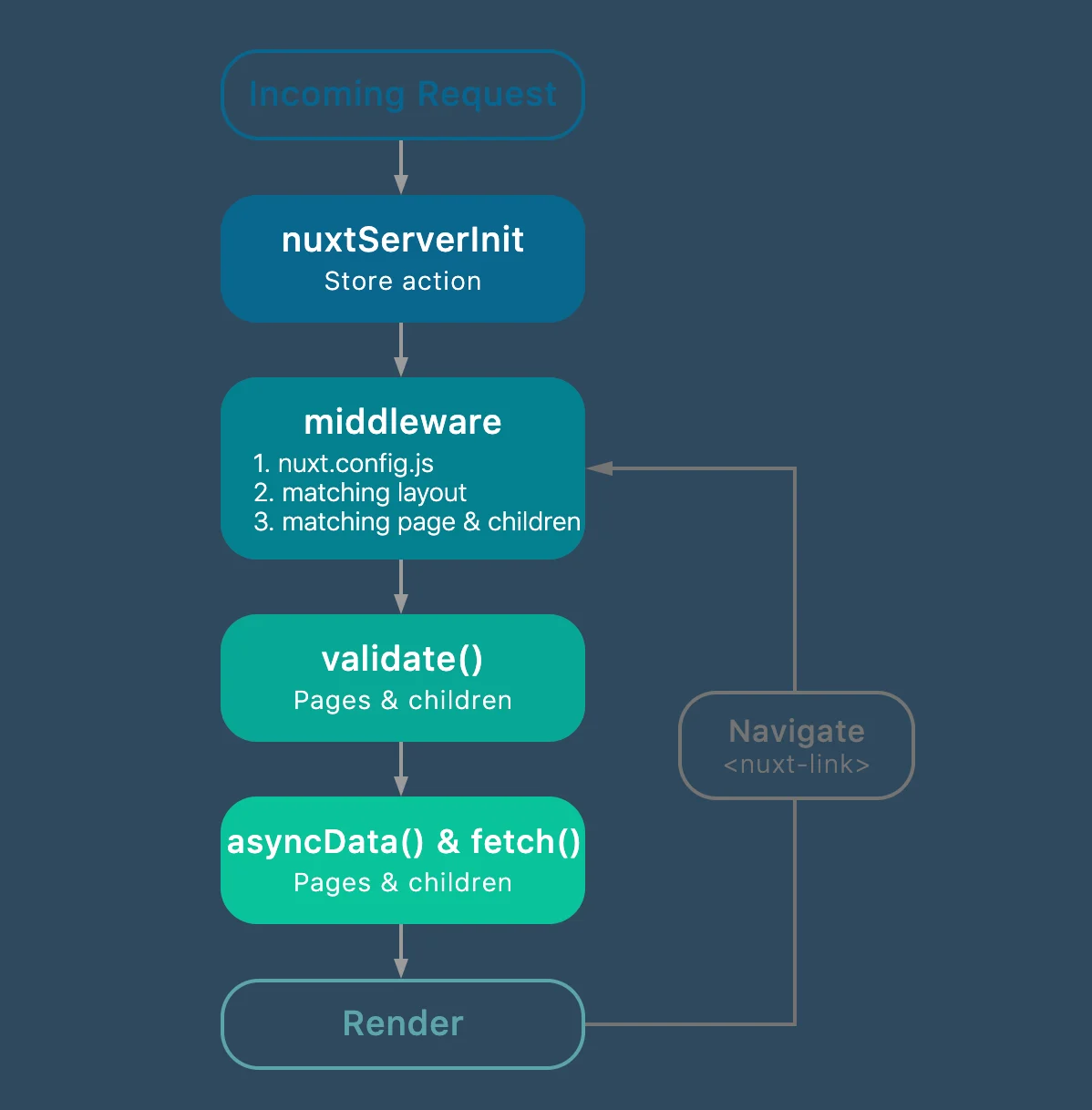
nuxt-lifecycle

According to the official NuxtJS Website:

If the action nuxtServerInit is defined in the store and the mode is universal, Nuxt.js will call it with the context (only from the server-side). It's useful when we have some data on the server we want to give directly to the client-side.

Letโ€™s import fetchuser.gql inside store (index.js)

import get_user_query from "~/apollo/queries/fetchusers.gql";

Then we make our query in nuxtServerInit:

export const state = () => ({
  user: {}
});

export const mutations = {
  set_user: function(state, user) {
    state.user = user;
  }
};

nuxtServerInit({ commit }, { error }) {
   const clientApollo = this.app.apolloProvider.defaultClient;
   return new Promise((resolve, reject) => {
     clientApollo
       .query({
         query: get_user_query,
         variables: {
           id: 3
         }
       })
       .then(resp => {
         commit("set_user", resp.data.user);
         resolve(resp);
       })
       .catch(err => {
         resolve(err);
       });
   });
 }

Now let's make use of the user data on our page:

import { mapState } from "vuex";

export default {
 data() {
   return {
   };
 },
 computed: {
   ...mapState({
     user: (state) => state.user
   }),
 },
}
<template>
 <div class="container">
   <div>
     <h4 class="title">{{ user }}</h4>
   </div>
 </div>
</template>

Yay! I hope you now understand how to make GraphQL queries in NuxtJS. You can explore more advanced features like saving cookies when the user logs in and using nuxtServerInit to check for a user session. If you have any questions or run into any trouble, feel free to reach out on Twitter or Github.

This Dot is a consultancy dedicated to guiding companies through their modernization and digital transformation journeys. Specializing in replatforming, modernizing, and launching new initiatives, we stand out by taking true ownership of your engineering projects.

We love helping teams with projects that have missed their deadlines or helping keep your strategic digital initiatives on course. Check out our case studies and our clients that trust us with their engineering.

You might also like

How to Leverage Apollo Client Fetch Policies Like the Pros cover image

How to Leverage Apollo Client Fetch Policies Like the Pros

Apollo Client provides a rich ecosystem and cache for interfacing with your GraphQL APIs. You write your query and leverage the useQuery hook to fetch your data. It provides you with some state context and eventually resolves your query. That data is stored in a local, normalized, in-memory cache, which allows Apollo Client to respond to most previously run requests near instantaneously. This has huge benefits for client performance and the feel of your apps. However, sometimes Apollo's default doesn't match the user experience you want to provide. They provide fetch policies to allow you to control this behavior on each query you execute. In this article, we'll explore the different fetch policies and how you should leverage them in your application. cache-first This is the default for Apollo Client. Apollo will execute your query against the cache. If the cache can fully fulfill the request, then that's it, and we return to the client. If it can only partially match your request or cannot find any of the related data, the query will be run against your GraphQL server. The response is cached for the next query and returned to the handler. This method prioritizes minimizing the number of requests sent to your server. However, it has an adverse effect on data that changes regularly. Think of your social media feeds - they typically contain constantly changing information as new posts are generated. Or a real-time dashboard app tracking data as it moves through a system. cache-first is probably not the best policy for these use cases as you won't fetch the latest data from the upstream source. You can lower the cache time of items for the dashboard to avoid the staleness issue and still minimize the requests being made, but this problem will persist for social media feeds. The cache-first policy should be considered for data that does not change often in your system or data that the current user fully controls. Data that doesn't change often is easily cached, and that's a recommended pattern. For data that the user controls, we need to consider how that data changes. If only the current user can change it, we have 2 options: Return the updated data in the response of any mutation which is used to update the cache Use cache invalidation methods like refetchQueries or onQueryUpdated These methods will ensure that our cache stays in sync with our server allowing the policy to work optimally. However, if other users in the system can make changes that impact the current user's view, then we can not invalidate the cache properly using these strategies which makes this policy unideal. network-only This policy skips the cache lookup and goes to the server to fetch the results. The results are stored in the cache for other operations to leverage. Going back to the example I gave in my explanation cache-first of a social media feed, the network-only policy would be a great way to implement the feed itself as it's ever-changing, and we'll likely even want to poll for changes every 10s or so. The following is an example of what this component could look like: ` Whenever this SocialFeed component is rendered, we always fetch the latest results from the GraphQL server ensuring we're looking at the current data. The results are put in the cache which we can leverage in some children components. cache-only cache-only only checks the cache for the requested data and never hits the server. It throws an error if the specified cache items cannot be found. At first glance, this cache policy may seem unhelpful because it's unclear if our cache is seeded with our data. However, in combination with the network-only policy above, this policy becomes helpful. This policy is meant for components down tree from network-only level query. This method is for you if you're a fan of React components' compatibility. We can modify the return of our previous example to be as follows: ` Notice we're not passing the full post object as a prop. This simplifies our Post component types and makes later refactors easier. The Post would like like the following: ` In this query, we're grabbing the data directly from our cache every time because our top-level query should have fetched it. Now, a small bug here makes maintainability a bit harder. Our top-level GetFeed query doesn't guarantee fetching the same fields. Notice how our Post component exports a fragment. Fragments are a feature Apollo supports to share query elements across operations. In our SocialFeed component, we can change our query to be: ` Now, as we change our Post to use new fields and display different data, the refactoring is restricted to just that component, and the upstream components will detect the changes and handle them for us making our codebase more maintainable. Because the upstream component is always fetching from the network, we can trust that the cache will have our data, making this component safe to render. With these examples, though, our users will likely have to see a loading spinner or state on every render unless we add some server rendering. cache-and-network This is where cache-and-network comes to play. With this policy, Apollo Client will run your query against your cache and your GraphQL server. This further simplifies our example above if we want to provide the last fetched results to the user but then update the feed immediately upon gathering the latest data. This is similar to what X/Twitter does when you reload the app. You'll see the last value that was in the cache then it'll render the network values when ready. This can cause a jarring user experience though, if the data is changing a lot over time, so I recommend using this methodology sparsely. However, if you wanted to update our existing example, we'd just change our SocialFeed component to use this policy, and that'll keep our client and server better in sync while still enabling 10s polling. no-cache This policy is very similar to the network-only policy, except it bypasses the local cache entirely. In our previous example, we wrote engagement as a sub-selector on a Post and stored fields there. These metrics can change in real time pretty drastically. Chat features, reactions, viewership numbers, etc., are all types of data that may change in real time. The no-cache policy is good when this type of data is active, such as during a live stream or within the first few hours of a post going out. You may typically want to use the cache-and-network policy eventually but during that active period, you'll probably want to use no-cache so your consumers can trust your data. I'd probably recommend changing your server to split these queries and run different policies for the operations for performance reasons. I haven't mentioned this yet, but you can make the fetch policy on a query dynamic, meaning you combine these different policies' pending states. This could look like the following: ` We pass whether the event is live to the component that then leverages that info to determine if we should cache or not when fetching the chat. That being said, we should consider using subscription operations for this type of feature as well, but that's an exercise for another blog post. standby This is the most uncommon fetch policy, but has a lot of use. This option runs like a cache-first query when it executes. However, by default, this query does not run and is treated like a "skip" until it is manually triggered by a refetch or updateQueries caller. You can achieve similar results by leveraging the useLazyQuery operator, but this maintains the same behavior as other useQuery operators so you'll have more consistency among your components. This method is primarily used for operations pending other queries to finish or when you want to trigger the caller on a mutation. Think about a dashboard with many filters that need to be applied before your query executes. The standby fetch policy can wait until the user hits the Apply or Submit button to execute the operation then calls a await client.refetchQueries({ include: ["DashboardQuery"] }), which will then allow your component to pull in the parameters for your operation and execute it. Again, you could achieve this with useLazyQuery so it's really up to you and your team how you want to approach this problem. To avoid learning 2 ways, though, I recommend picking just one path. Conclusion Apollo Client's fetch policies are a versatile and helpful tool for managing your application data and keeping it in sync with your GraphQL server. In general, you should use the defaults provided by the library, but think about the user experience you want to provide. This will help you determine which policy best meets your needs. Leveraging tools like fragments will enable you to manage your application and use composable patterns more effectively. With the rise of React Server Components and other similar patterns, you'll need to be wary of how that impacts your Apollo Client strategy. However, if you're on a legacy application that leverages traditional SSR patterns, Apollo allows you to pre-render queries on the server and their related cache. When you combine these technologies, you'll find that your apps perform great, and your users will be delighted....

Nuxt 3 Demo App with Prerender and SSR cover image

Nuxt 3 Demo App with Prerender and SSR

Introduction The quest for an optimal web application involves numerous factors, such as performance, user experience, and search engine optimization (SEO). Nuxt 3 provides excellent features out-of-the-box that can help you tackle these aspects efficiently. This article will guide you in creating a Nuxt 3 application using Server Side Rendering (SSR) and pre-rendering capabilities. We'll craft an application that offers a seamless user experience, superior performance, and improved SEO. Server Side Rendering in Nuxt 3 Enhancing User Experience and SEO with SSR In the world of web development, Server Side Rendering (SSR) has gained significant traction. It refers to the server rendering the webpage upon each request rather than the client. With SSR, your web page arrives fully formed at the client's doorstep, reducing the time for the first painting. The advantage of SSR extends beyond just performance and user experience. It's also a darling of search engine crawlers, which find it easier to index your website with fully formed page content at the time of their crawl. In simple terms, it's like providing a tour guide to lead the search engine around your website, ensuring they get all the spots! The Power of SSR in Nuxt 3 Nuxt 3 has built-in support for SSR by default. It allows you to optimize your application by loading the data before rendering the page. To take advantage of SSR, you simply build your application as you usually would. In this case, using the fetch() method to load some. ` In this example, the fetchData function fetches the data before rendering the page. The data then gets displayed within the tag. Sidenote, if you wanted to disable SSR in your Nuxt application, you would do so in your nuxt.config.ts file: `` More details on how this works can be found in the rendering modes section in the official Nuxt 3 documentation. Pre-rendering in Nuxt 3 Amplifying Application Performance with Pre-rendering While SSR has its advantages, another superhero in our story is pre-rendering. Pre-rendering refers to the process of generating the static HTML pages of a site in advance. It's like preparing a feast before the guests arrive so you can serve them promptly. Like SSR, pre-rendering enhances SEO, as search engines can index fully rendered pages. Especially for content-heavy applications, pre-rendering can give a turbo boost to performance, leading to better user engagement and retention. Leverage Pre-rendering with Nuxt 3 Nuxt 3 supports SSR and Static Site Generation (SSG), including pre-rendering. To enable prerendering, you need to export your routes in nuxt.config.ts: ` These routes will be pre-rendered during the build phase, allowing for swift navigation. Let's update our application to pre-render the users' list: ` In the nuxt.config.ts, include the users' route for pre-rendering: ` Going beyond with Nuxt 3 While SSR and pre-rendering are significant for performance and SEO, Nuxt 3 offers more advanced features like hot module replacement, Vue 3 integration, improved error handling, and more. Nuxt 3 also has different kinds of rendering modes for different applications; in our SSR case, we used the default Universal rendering mode. Leveraging these features allows you to develop robust, high-performance, and user-friendly applications. Conclusion In this article, we delved into the concepts of SSR and pre-rendering in Nuxt 3. We explored how these techniques contribute to enhancing performance, user experience, and SEO. You can create exceptional web applications by integrating Vue 3's capabilities with Nuxt 3's robust features. A well-structured, performant, and SEO-friendly application not only attract users but also retains them. Embrace the power of Nuxt 3 and Vue 3 in your development journey. Happy coding!...

Testing Vue Composables with Jest cover image

Testing Vue Composables with Jest

In this post, we will take a look at how to test Vue composables with Jest. What Are Composables? When developing large scale frontend applications, we reuse logic for repetitive tasks. With composables, we are able to resuse logic in a stateful manner with the help of the composition API. Testing For this example, we create a composable to handle changes in screen size. Depending on how complex your composable is, you can simply test the reactivity directly or load it into a wrapper component, and then test the wrapper component. ` Let's write the following tests for this composable. - check currect value of screen size - check currect value of screen size after resize event is fired To test that the resize event changes the current value when fired, we need to load our composable in a component. ` From the implementation we completed above, the core logic of our breakpoint method is in an external function called "composable", and we can simply reuse it across our frontend code. Any manipulation to the state of a composable should be done directly within the composable to avoid bugs and make it easier to read. I hope this article has been helpful. If you have any questions or run into any trouble, feel free to reach out on Twitter or Github....

Understanding Sourcemaps: From Development to Production cover image

Understanding Sourcemaps: From Development to Production

What Are Sourcemaps? Modern web development involves transforming your source code before deploying it. We minify JavaScript to reduce file sizes, bundle multiple files together, transpile TypeScript to JavaScript, and convert modern syntax into browser-compatible code. These optimizations are essential for performance, but they create a significant problem: the code running in production does not look like the original code you wrote. Here's a simple example. Your original code might look like this: ` After minification, it becomes something like this: ` Now imagine trying to debug an error in that minified code. Which line threw the exception? What was the value of variable d? This is where sourcemaps come in. A sourcemap is a JSON file that contains a mapping between your transformed code and your original source files. When you open browser DevTools, the browser reads these mappings and reconstructs your original code, allowing you to debug with variable names, comments, and proper formatting intact. How Sourcemaps Work When you build your application with tools like Webpack, Vite, or Rollup, they can generate sourcemap files alongside your production bundles. A minified file references its sourcemap using a special comment at the end: ` The sourcemap file itself contains a JSON structure with several key fields: ` The mappings field uses an encoding format called VLQ (Variable Length Quantity) to map each position in the minified code back to its original location. The browser's DevTools use this information to show you the original code while you're debugging. Types of Sourcemaps Build tools support several variations of sourcemaps, each with different trade-offs: Inline sourcemaps: The entire mapping is embedded directly in your JavaScript file as a base64 encoded data URL. This increases file size significantly but simplifies deployment during development. ` External sourcemaps: A separate .map file that's referenced by the JavaScript bundle. This is the most common approach, as it keeps your production bundles lean since sourcemaps are only downloaded when DevTools is open. Hidden sourcemaps: External sourcemap files without any reference in the JavaScript bundle. These are useful when you want sourcemaps available for error tracking services like Sentry, but don't want to expose them to end users. Why Sourcemaps During development, sourcemaps are absolutely critical. They will help avoid having to guess where errors occur, making debugging much easier. Most modern build tools enable sourcemaps by default in development mode. Sourcemaps in Production Should you ship sourcemaps to production? It depends. While security by making your code more difficult to read is not real security, there's a legitimate argument that exposing your source code makes it easier for attackers to understand your application's internals. Sourcemaps can reveal internal API endpoints and routing logic, business logic, and algorithmic implementations, code comments that might contain developer notes or TODO items. Anyone with basic developer tools can reconstruct your entire codebase when sourcemaps are publicly accessible. While the Apple leak contained no credentials or secrets, it did expose their component architecture and implementation patterns. Additionally, code comments can inadvertently contain internal URLs, developer names, or company-specific information that could potentially be exploited by attackers. But thatโ€™s not all of it. On the other hand, services like Sentry can provide much more actionable error reports when they have access to sourcemaps. So you can understand exactly where errors happened. If a customer reports an issue, being able to see the actual error with proper context makes diagnosis significantly faster. If your security depends on keeping your frontend code secret, you have bigger problems. Any determined attacker can reverse engineer minified JavaScript. It just takes more time. Sourcemaps are only downloaded when DevTools is open, so shipping them to production doesn't affect load times or performance for end users. How to manage sourcemaps in production You don't have to choose between no sourcemaps and publicly accessible ones. For example, you can restrict access to sourcemaps with server configuration. You can make .map accessible from specific IP addresses. Additionally, tools like Sentry allow you to upload sourcemaps during your build process without making them publicly accessible. Then configure your build to generate sourcemaps without the reference comment, or use hidden sourcemaps. Sentry gets the mapping information it needs, but end users can't access the files. Learning from Apple's Incident Apple's sourcemap incident is a valuable reminder that even the largest tech companies can make deployment oversights. But it also highlights something important: the presence of sourcemaps wasn't actually a security vulnerability. This can be achieved by following good security practices. Never include sensitive data in client code. Developers got an interesting look at how Apple structures its Svelte codebase. The lesson is that you must be intentional about your deployment configuration. If you're going to include sourcemaps in production, make that decision deliberately after considering the trade-offs. And if you decide against using public sourcemaps, verify that your build process actually removes them. In this case, the public repo was quickly removed after Apple filed a DMCA takedown. (https://github.com/github/dmca/blob/master/2025/11/2025-11-05-apple.md) Making the Right Choice So what should you do with sourcemaps in your projects? For development: Always enable them. Use fast options, such as eval-source-map in Webpack or the default configuration in Vite. The debugging benefits far outweigh any downsides. For production: Consider your specific situation. But most importantly, make sure your sourcemaps don't accidentally expose secrets. Review your build output, check for hardcoded credentials, and ensure sensitive configurations stay on the backend where they belong. Conclusion Sourcemaps are powerful development tools that bridge the gap between the optimized code your users download and the readable code you write. They're essential for debugging and make error tracking more effective. The question of whether to include them in production doesn't have a unique answer. Whatever you decide, make it a deliberate choice. Review your build configuration. Verify that sourcemaps are handled the way you expect. And remember that proper frontend security doesn't come from hiding your code. Useful Resources * Source map specification - https://tc39.es/ecma426/ * What are sourcemaps - https://web.dev/articles/source-maps * VLQ implementation - https://github.com/Rich-Harris/vlq * Sentry sourcemaps - https://docs.sentry.io/platforms/javascript/sourcemaps/ * Apple DMCA takedown - https://github.com/github/dmca/blob/master/2025/11/2025-11-05-apple.md...

Let's innovate together!

We're ready to be your trusted technical partners in your digital innovation journey.

Whether it's modernization or custom software solutions, our team of experts can guide you through best practices and how to build scalable, performant software that lasts.

Prefer email? hi@thisdot.co